
An in-depth 2026 guide to the best AI smart glasses — covering audio, camera, and display models, real pricing, legal considerations, and how to choose the right pair.
The AI smart glasses category has split into two genuinely different product types, and most buying guides still treat them as one — which is exactly why so many first-time buyers end up disappointed. There are audio/camera AI glasses (like Ray-Ban Meta) that layer an AI assistant and microphone array onto sunglasses, and there are true display AI glasses that project a heads-up interface directly into your line of sight. Confusing the two leads people to buy a $300 pair of smart sunglasses expecting a sci-fi HUD, or vice versa.
This guide breaks down both categories in full, covers real-world pricing across every model, examines the legal and health considerations most reviews skip entirely, and gives you a structured way to figure out which type — and which specific model — actually fits your life.
The Market Context: Why AI Glasses Finally Work in 2026
Smart glasses have existed in various forms since Google Glass launched in 2013, but early attempts failed for a simple reason: the hardware couldn’t keep pace with the software ambition. That’s changed. According to market analysis from Counterpoint Research, global smart glasses shipments grew significantly year-over-year through 2025, driven almost entirely by AI-assistant integration rather than the augmented-reality gimmicks that defined the category a decade ago.
The practical shift: on-device and low-latency cloud AI processing finally made “ask your glasses a question and get a useful answer in under two seconds” a reality rather than a demo-only feature. That’s the technical unlock that makes this entire category worth revisiting in 2026.
Read our complete guide on Ottocast P3 Pro Review 2026.
Two Categories of AI Smart Glasses (Know the Difference Before You Buy)
Category 1: Audio + Camera AI Glasses
These look like normal glasses or sunglasses. They include a microphone array, open-ear speakers, and often a camera, with an AI assistant (Meta AI, ChatGPT, or Alexa) handling voice queries. There is no visual display — you hear responses, you don’t see them projected into your vision. Ray-Ban Meta, Oakley Meta HSTN, SOLOS AirGo 3, Lucyd Lyte, and Amazon Echo Frames all fall into this category.
Category 2: True Display (HUD) AI Glasses
These project a small heads-up display into one or both lenses using waveguide or micro-LED projection technology, letting you actually see AI responses, translated text, navigation arrows, or notifications overlaid on the real world. This category includes newer 2025–2026 entrants like the Meta Ray-Ban Display, Even Realities G1, and Halliday Glasses.
Most existing buying guides only cover Category 1. That’s a meaningful gap, because if what you actually want is a visible AI interface rather than an audio-only assistant, none of the audio-only models will satisfy you regardless of how good their AI integration is.
Top AI Smart Glasses Compared (2026)
| Model | Category | AI Assistant | Camera | Display | Battery | Price (USD) |
|---|---|---|---|---|---|---|
| Ray-Ban Meta | Audio + Camera | Meta AI | 12MP | None | 4–6 hrs | $299–$379 |
| Oakley Meta HSTN | Audio + Camera | Meta AI | 12MP (3K video) | None | 8 hrs | $399–$499 |
| Meta Ray-Ban Display | Display + Camera | Meta AI | 12MP | Monocular HUD | ~6 hrs | $799 |
| Even Realities G1 | Display Only | Companion app AI | None | Dual waveguide HUD | ~24 hrs (standby heavy) | $599 |
| SOLOS AirGo 3 | Audio Only | ChatGPT | None | None | ~2 hrs active | $249 |
| Lucyd Lyte | Audio Only | Phone assistant passthrough | None | None | 6.5–12 hrs | $149–$229 |
| Amazon Echo Frames (3rd Gen) | Audio Only | Alexa | None | None | Up to 14 hrs | $269.99 |
Pricing reflects standard retail listings as of 2026 and varies by frame style, lens type, and retailer promotions.
Audio + Camera AI Glasses: Detailed Reviews
Ray-Ban Meta — Best Overall Value
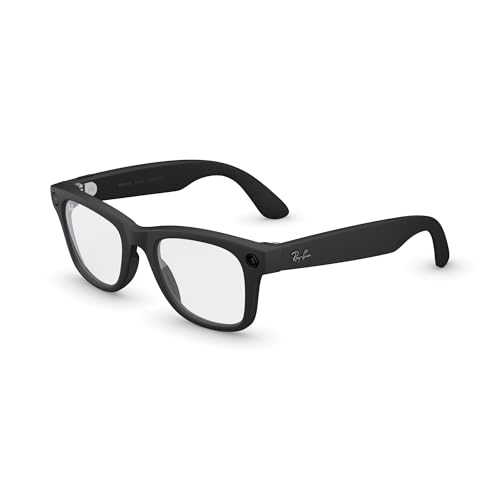
Ray-Ban Meta remains the category benchmark for a simple reason: it doesn’t look like a gadget. The classic Wayfarer silhouette houses a 12MP ultra-wide camera and five-microphone array, and Meta AI’s “look and ask” feature — where the camera provides visual context for spoken questions — is genuinely the most mature implementation of visual AI in consumer eyewear right now.
Battery life sits at 4–6 hours of mixed use, extended to roughly 36 hours total with the charging case. Live streaming to Instagram and Facebook is capped by a 30-minute thermal limit, and the 32GB of onboard storage comfortably handles a day of photo and short video capture.
Price: $299 (standard) to $379 (premium lens/frame combinations)
- #1 SELLING AI GLASSES – Tap into iconic style for men and women, and advanced technology with the newest generation of R…
- UP TO 8 HOURS OF BATTERY LIFE – On a full charge, these smart AI glasses can last 2x longer than previous generations, u…
- 3K ULTRA HD: RECORD SHARP VIDEOS WITH RICH DETAIL — Hands-free video recording with an ultra-wide 12 MP camera in up to …
Oakley Meta HSTN — Best for Active Use
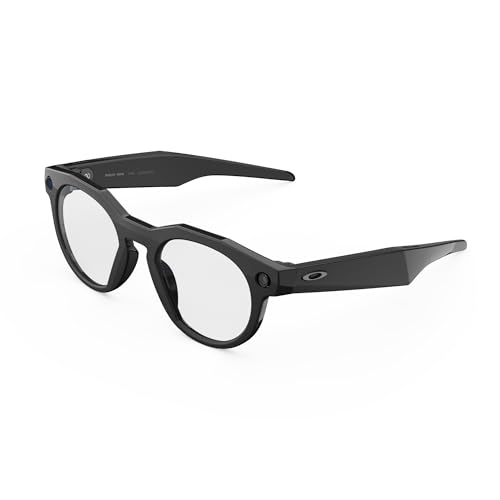
Built for athletes rather than everyday wear, the HSTN doubles Ray-Ban Meta’s battery life to a genuine 8 hours of active use and bumps video capture to 3K resolution. Prizm lens technology and a wraparound, sport-secure fit make this the pick for runners, cyclists, and outdoor content creators — at a $100–$150 premium over the standard Ray-Ban Meta.
Price: $399–$499
- DESIGNED TO GIVE YOU AN EDGE ON AND OFF THE FIELD — Wearable technology that allows you to capture photos and video reco…
- UP TO 8 HOURS OF BATTERY LIFE — A fully charged pair of Oakley Meta HSTN glasses can last up to 8 hours of typical use. …
- LISTEN WITH OPEN-EAR AUDIO — Oakley Meta HSTN has open-ear audio and bluetooth so you can enjoy your favorite music righ…
SOLOS AirGo 3 — Best for Translation and ChatGPT Access
SOLOS skips the camera entirely, which unlocks a genuinely superior IP67 water/dust rating and sidesteps most privacy objections outright. Direct ChatGPT access through SolosChat and real-time translation across roughly 25 languages make this the strongest pick for frequent travelers, though the 2-hour battery life is a real limitation for all-day wear.
Price: $249

- AUDIO SMART GLASSES powered by ChatGPT/Open AI, IP67 Rating and long battery life
- REALTIME LANGUAGE TRANSLATION with SOLOS Translate, powered by ChatGPT, supports 25 languages
- SOLOS CHAT powered by ChatGPT, AI Assistance at the touch of a button, voice search, texting, music
Lucyd Lyte — Best Battery-to-Price Ratio
Lucyd Lyte deliberately skips advanced AI in favor of doing the fundamentals — audio quality, comfort, and battery life — exceptionally well. At 6.5–12 hours of playback and a starting price under $150, it’s the rational choice for anyone who wants smart glasses convenience without paying for AI features they won’t use, relying instead on your phone’s existing assistant (Siri, Google Assistant) via passthrough.
Price: $149–$229

- Bluetooth Connectivity: Easily connect your devices for hands-free calls and wireless music with these Bluetooth smart g…
- UV400 Polarized Lenses: Provides great protection against UV rays and reduces glare, making these glasses perfect for ou…
- Open-Ear Speakers and Microphone: Comes with built-in open-ear speakers and a microphone, allowing you to communicate co…
Amazon Echo Frames (3rd Gen) — Best Budget Entry
For Alexa households, Echo Frames offer the most affordable entry point into the category, with strong smart-home voice control and up to 14 hours of battery life. The absence of a camera keeps the price low and sidesteps privacy concerns, but functionality is entirely locked to Amazon’s ecosystem.
Price: $269.99

- 【4K HD CAMERA SMART GLASSES 】Equipped with an 8-megapixel HD lens and 3-axis anti-shake sensor, capture clear photos and…
- 【7-IN-1 ALL-WEATHER EVOLUTION: INDOORS & OUT】These Demabon smart glasses serve as your ultimate tech hub, now upgraded w…
- 【SPRING TRAVEL & DIGITAL WELLNESS】Seamlessly transition from city strolls to the digital office. Capture stunning POV vi…
Display AI Glasses: The Category Most Guides Miss
Meta Ray-Ban Display — The First Mainstream HUD
Released in late 2025, the Meta Ray-Ban Display adds a monocular waveguide display to the right lens, capable of showing texts, turn-by-turn navigation, live captions, and Meta AI responses as actual visible text and graphics rather than audio-only replies. It pairs with the Meta Neural Band, a wristband that reads subtle muscle signals for discreet, near-invisible control — a genuinely novel input method compared to touch panels on the temple.
Battery life runs around 6 hours of mixed use, and at $799, it costs roughly double the standard Ray-Ban Meta — a meaningful jump that reflects the added display hardware complexity.
Even Realities G1 — Best for All-Day Discreet Display
The G1 takes a different design philosophy: dual micro-LED waveguide displays built into genuinely lightweight, prescription-compatible frames that look almost indistinguishable from normal glasses. No camera, no speakers for media — it’s built purely as a visual information layer, showing notifications, translated subtitles, teleprompter text, and navigation prompts. Standby battery life is excellent (multi-day), though active display use drains it considerably faster.
Price: $599
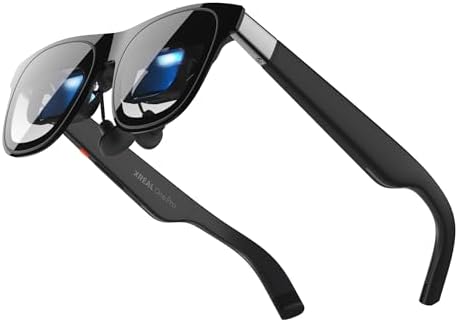
- XREAL’s Self-Developed X1 Spatial Computing Chip: Delivers Native 3DoF tracking with ultra-low 3ms M2P latency, ensuring…
- The New Optic Engine-X-Prism Optics: XREAL’s advanced lens and projection system—ultra-slim, precision-engineered optics…
- Experience True AR with 6 DoF, Spatial Anchor Anytime: Pairing with XREAL Eye, anchor your screen anywhere in your room,…
How to Choose: A Decision Framework
Rather than ranking these against each other in the abstract, work through these questions:
Do you want to see AI responses, or just hear them? If seeing matters, you need a display model (Meta Ray-Ban Display, Even Realities G1). If audio is fine, any Category 1 model works and will cost significantly less.
Is a camera a requirement or a liability? Content creators and social sharers want a camera (Ray-Ban Meta, Oakley Meta HSTN). Privacy-conscious buyers, or anyone working in camera-restricted environments (hospitals, secure offices, courtrooms), should choose camera-free models (SOLOS, Lucyd, Echo Frames, Even Realities G1).
What’s your daily battery reality? If you can’t reliably charge glasses midday, prioritize Lucyd Lyte or Echo Frames. If you’re near a charging case regularly, shorter-battery premium options become viable.
Which AI ecosystem do you already use? Heavy ChatGPT users benefit most from SOLOS. Meta ecosystem users (Instagram/WhatsApp-centric) get the most integrated experience from Ray-Ban or Oakley Meta. Alexa smart-home households should default to Echo Frames.
The Legal and Privacy Reality of Camera-Equipped Glasses
This is the section most reviews skip entirely, and it matters more than any spec comparison.
Recording consent laws vary significantly by U.S. state. Roughly a dozen states — including California, Florida, and Illinois — operate under two-party (or all-party) consent requirements for recording audio conversations, meaning every participant must agree to being recorded, according to a jurisdiction summary maintained by the Digital Media Law Project. Casually recording a conversation with camera glasses in these states — even with the LED indicator active — can carry real legal exposure if a participant didn’t consent.
LED recording indicators are also not a perfect safeguard. Independent testing has repeatedly shown that indicator visibility depends heavily on ambient lighting and the angle at which someone views the glasses, meaning bystanders in bright daylight may not reliably notice an active recording light. If you’re buying camera-equipped glasses, understand your state’s consent laws before you casually film conversations, meetings, or interactions in public.
Explore our step-by-step guide to ChatGPT Expertise PLR Complete 2026 Guide.
Eye Health and Display Safety Considerations
Display-equipped smart glasses introduce a genuinely new question: is projecting light directly toward your eye for hours daily a health concern? The short answer, according to guidance from the American Academy of Ophthalmology, is that waveguide and micro-LED displays used in current consumer smart glasses operate at brightness and exposure levels well below thresholds of concern — comparable to, or lower than, typical smartphone screen exposure. That said, the same general screen-time guidance applies: extended near-field visual focus can contribute to digital eye strain, and the American Academy of Ophthalmology recommends the standard 20-20-20 rule (every 20 minutes, look at something 20 feet away for 20 seconds) regardless of whether you’re viewing a phone, monitor, or HUD display.
For audio-only models without any display component, this consideration doesn’t apply at all — a relevant factor for anyone specifically avoiding additional near-eye screen exposure.
Setup and Day-One Expectations
Regardless of model, initial setup follows a broadly similar pattern: pair via the manufacturer’s companion app (Meta AI app, SOLOS app, Alexa app, or Even Realities app), complete a firmware update on first connection (often 10–20 minutes), and calibrate voice recognition to your speech pattern. Display models additionally require a brief visual calibration step to align the projected image correctly to your eye position — skipping or rushing this step is the most common cause of “blurry HUD” complaints in early reviews.
Expect a genuine adjustment period of 3–5 days before AI response habits (when to speak, how to phrase visual queries) start feeling natural rather than effortful.
Frequently Asked Questions
Do AI smart glasses work without a smartphone?
No current consumer model functions fully independently. All require an initial smartphone pairing for setup, firmware updates, and in most cases, ongoing Bluetooth connectivity for AI processing and data transmission.
How is a display AI glasses HUD different from AR headsets like Vision Pro?
Display smart glasses use lightweight waveguide or micro-LED projection limited to simple text, icons, and notifications in a small field of view — not full 3D augmented reality. Headsets like Vision Pro or Quest use dramatically more powerful (and heavier, more expensive) hardware for immersive spatial computing. Think “smartwatch notifications for your eyes” rather than “holographic overlay of your entire environment.”
Can I get prescription lenses in AI smart glasses?
Most major brands, including Ray-Ban Meta and Even Realities, offer prescription lens compatibility through partnered opticians or in-house prescription programs, though display models have more limited prescription range due to waveguide optical requirements.
What happens to the data my glasses collect?
This varies by manufacturer. Meta processes visual and audio queries through its servers per its stated privacy policy; Amazon retains Alexa request data with user-controlled deletion options; SOLOS routes ChatGPT queries through OpenAI’s infrastructure. Always review the specific privacy policy of the ecosystem you’re buying into, since “AI glasses” as a category spans several genuinely different data-handling approaches.
Are AI smart glasses worth it over just using my phone?
For hands-free, glanceable interactions — navigation prompts, quick translation, live captions, voice queries while your hands are occupied — yes, meaningfully. For complex research, detailed reading, or anything requiring a large screen, your phone remains the better tool. Most owners report using AI glasses as a complement to their phone, not a replacement.
Final Recommendation
If you want the most complete, well-rounded introduction to AI glasses, Ray-Ban Meta remains the safest recommendation — proven hardware, strong AI integration, and a price point that doesn’t require a leap of faith. If a visible display genuinely matters to your use case, Meta Ray-Ban Display is the most mainstream-ready option currently shipping, while Even Realities G1 is the better pick if all-day comfort and a camera-free design outweigh brand ecosystem familiarity. Budget-conscious buyers should default to Lucyd Lyte or Amazon Echo Frames depending on whether phone-assistant passthrough or Alexa integration matters more to their daily routine.
Whichever you choose, factor in your state’s recording consent laws before buying a camera-equipped model, and give yourself the full adjustment week before judging whether the AI integration genuinely earns its place in your daily routine.
External Authoritative Sources Referenced
- Counterpoint Research — Global Smart Glasses Market Insights
- Digital Media Law Project — Recording Consent Laws by State
- American Academy of Ophthalmology — Digital Screen and Eye Health Guidance
Affiliate Disclosure
Affiliate Disclosure:
This article may contain affiliate links. If you click on one of these links and make a purchase, I may earn a small commission at no additional cost to you. These commissions help support the maintenance of this website and allow me to continue creating free, high-quality content.
I only recommend AI smart glasses, gadgets, and technology products that I have researched carefully or believe provide genuine value to readers. However, product features, pricing, and availability may change over time, so I encourage you to verify the latest information on the official retailer’s website before making a purchase.
Thank you for supporting AI Blogging And Online Income through your purchases.
About the Author