How does the Google search engine really work? Learn how Google crawls, indexes, and ranks pages—and what you can do to improve your rankings in 2026.

Every day, Americans make approximately 8.5 billion Google searches. Eight and a half billion. That’s roughly 99,000 searches every single second, covering everything from “best tacos near me” to “symptoms of sleep deprivation” to “how to apologize to your dog.” (Yes, people Google that.)
Behind each of those searches, something extraordinary happens in under half a second: Google’s systems analyze billions of web pages, evaluate hundreds of ranking signals, personalize results to the specific Show users the most relevant online results, ranked by relevance from sources across the internet.
Most of us just type something and click. The machinery underneath that interaction is one of the most sophisticated computational systems ever built, and understanding even its basics—how it crawls, indexes, and ranks pages—is genuinely useful whether you’re a website owner, marketer, student, or just deeply curious about how the most-visited website on earth actually works.
How Does the Google Search Engine Work?
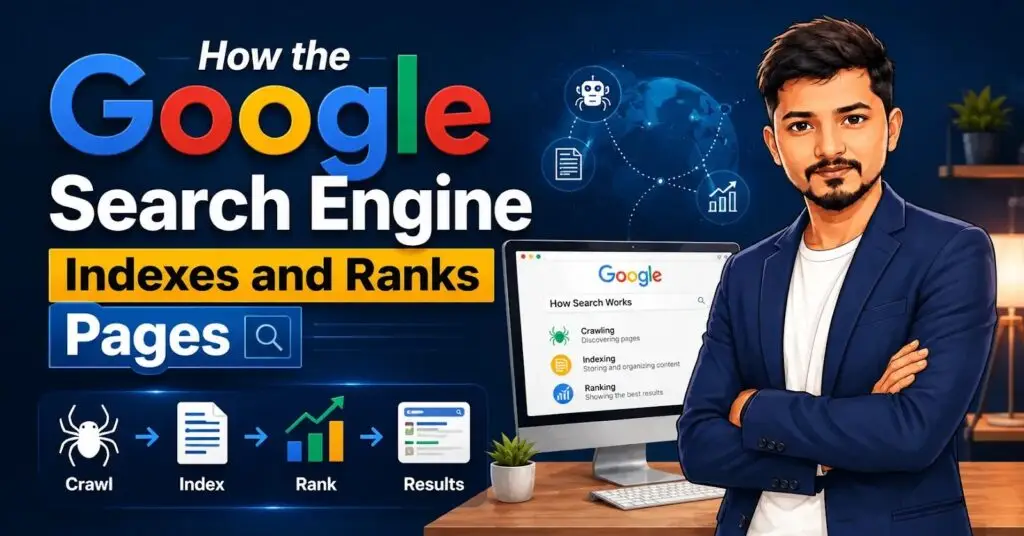
Google’s search process happens in three distinct stages, each happening sequentially before you ever see a search result.
Stage 1: Crawling. Google uses automated programs called Googlebot—web crawlers—to systematically browse the internet, discovering web pages by following links from one page to another. Think of Googlebot as an extraordinarily diligent librarian who walks through the entire library, reading every book, noting every page referenced in every footnote, then following those references to find more books.
Stage 2: Indexing. After crawling a page, Google analyzes its content—text, images, videos, structured data—and stores this information in Google’s Search Index, a massive database containing information about hundreds of billions of web pages. This is what Google actually searches when you type a query.
Stage 3: Serving results. When you search, Google’s algorithms analyze your specific query, assess all the potentially relevant indexed pages, apply hundreds of ranking factors, personalize based on your context, and serve results in under 500 milliseconds.
This three-stage process happens continuously—crawling the web to discover new and updated pages, indexing their content, and refining ranking algorithms to serve better results.
Learn more in our in-depth guide on “How to Fix Low Rankings with AI”.
How Does Google Crawl and Index Websites?
Understanding the crawling process specifically matters for anyone managing a website—because if Googlebot can’t properly crawl your site, even the most brilliant content won’t appear in search results.
How crawling actually starts:
Googlebot typically discovers new pages in two primary ways. First, by following links from already-indexed pages—if a reputable website links to your new article, Googlebot may discover and crawl it relatively quickly. Second, through XML sitemaps that website owners submit through Google Search Console, essentially handing Google a map of your entire site.
Crawl budget: Google doesn’t crawl every page on every site continuously. Each domain is allocated what’s called a “crawl budget”—the number of pages Googlebot will crawl within a given time period, based on your site’s size, authority, and the frequency of content updates. Large, authoritative sites get more crawl budget; smaller or lower-authority sites get less.
Indexing is not automatic: Crawling and indexing are separate steps. Googlebot can crawl a page without indexing it—this happens when the page has a “noindex” tag, the content is thin or duplicate, or Google’s systems determine the page doesn’t add sufficient value to the index. Not every page you publish will automatically appear in Google’s search results.
How to check your indexing status: Google Search Console’s Coverage report shows you exactly which of your pages are indexed, which are excluded and why, and what errors might be preventing indexing. This free tool is essential for anyone managing a website seriously.
What Is the Typical Time for Google to Index a New Page?
This varies considerably, and understanding why prevents unrealistic expectations.
Typical timelines:
| Site Authority | Content Type | Typical Indexing Time |
|---|---|---|
| Established, high-authority site | New page on existing site | Hours to a few days |
| Medium authority blog | New article | Days to weeks |
| New website | First pages | Weeks to months |
| Pages without inbound links | Any content | Very slow to never |
The fastest way to get indexed: Submit your page directly through Google Search Console’s URL Inspection tool, which allows you to manually request indexing. This typically accelerates the process significantly compared to waiting for Googlebot to discover the page organically.
Why some pages never get indexed: Common reasons include being blocked by robots.txt file, having a “noindex” meta tag (sometimes added accidentally by WordPress plugins during development), having thin or duplicate content, or having no inbound links making the page essentially invisible to Googlebot’s link-following approach.
Explore our step-by-step guide to “Can You Earn Money with AI Blogging”.
What Are Google’s Ranking Factors for Search Results?
This is the question every website owner and SEO professional obsesses over, and honestly—the complete answer is more complex than any single article can cover. Google uses hundreds of signals in their ranking algorithms, and the weights of these signals shift with algorithm updates.
The signals Google has publicly confirmed matter:
Relevance: Does the page’s content match what the searcher actually wants? Google evaluates this through keyword matching, topical comprehensiveness, and increasingly through semantic understanding of query intent.
Page quality and E-E-A-T: Experience, Expertise, Authoritativeness, and Trustworthiness. Google’s quality raters use these principles to evaluate content, particularly for YMYL (Your Money or Your Life) topics like health, finance, and legal information. First-hand experience has become an increasingly emphasized component since the “Experience” addition to this framework.
Backlinks: Links from other websites to yours remain one of the strongest ranking signals, serving as a proxy for how much the broader web community values your content. Quality matters far more than quantity—one link from a highly authoritative, topically relevant site outweighs hundreds from low-authority directories.
Page experience signals: Core Web Vitals (Largest Contentful Paint, Interaction to Next Paint, Cumulative Layout Shift) measure actual user experience metrics like loading speed, interactivity, and visual stability. Google’s PageSpeed Insights provides specific diagnostics for each.
Mobile-friendliness: Google uses mobile-first indexing, meaning it primarily evaluates your site’s mobile version for ranking purposes. Google’s Mobile-Friendly Test provides quick assessment.
Freshness: For queries where recent information matters (news, current events, trending topics), more recently published or updated content receives ranking preference.
How Does Google Personalize Search Results for Users?
Your Google search results aren’t the same as your neighbor’s—even if you search for identical terms. Google personalizes results based on several factors.
Location: “Restaurants near me” obviously needs location data, but even non-location queries are influenced by your geographic location. Searching “football schedule” in Dallas vs Seattle may surface different teams’ schedules.
Search history: If Google determines from your previous searches that you’re interested in running, a query for “best shoes” may surface running shoes rather than dress shoes.
Device type: Mobile results sometimes differ from desktop results, reflecting different use contexts.
Language preferences: Google serves results in your preferred language and may adjust results for regional spelling variations (color vs colour).
The privacy consideration: Google Search personalization has drawn significant attention from privacy advocates. You can reduce personalization by searching in Incognito mode, signing out of your Google account, or adjusting your search settings to disable personalization.
What Is the Difference Between Organic Results and Google Ads?
This distinction matters enormously for both users and website owners.
Organic results are pages that appear in Google’s search results purely because Google’s algorithms determined them most relevant and authoritative for the query. Website owners can’t pay to appear in organic results—they can only influence them through SEO.
Google Ads results (previously called Google AdWords) appear above, below, or alongside organic results. Advertisers bid on specific keywords through the Google Ads platform, paying when users click their ads (cost-per-click model). These results are labeled “Sponsored” in Google’s interface.
The practical difference for users: Organic results reflect Google’s editorial judgment about relevance and quality. Paid results reflect whoever bid enough to appear—though Google does apply Quality Score assessments that partially prevent entirely irrelevant ads from dominating.
For website owners: Ranking organically for competitive commercial keywords can deliver sustained traffic without per-click costs, but requires significant SEO investment in content, technical optimization, and link building. Google Ads provides immediate visibility but costs continue as long as campaigns run.
Find detailed insights in our article on “Fastest Free Blog Posting Sites for Beginners”.
How Can I Get My Website to Show Up on Google Search?
The practical steps for getting a new site into Google’s index.
Step 1: Submit your sitemap to Google Search Console. This is the most direct way to tell Google about your site’s existence and structure. Create a free Search Console account, verify site ownership, and submit your XML sitemap (most WordPress themes and SEO plugins generate this automatically).
Step 2: Build internal links. Link between your own pages to help Googlebot discover all your content by following internal links.
Step 3: Earn external links. Getting reputable websites to link to yours accelerates both discovery and eventual ranking.
Step 4: Create genuinely useful, original content. Google’s systems have grown increasingly capable of distinguishing thin, generic content from substantive, expert-level pages. Quality content earns both indexing and ranking.
Step 5: Monitor through Search Console. Google Search Console’s URL Inspection tool lets you check any specific page’s indexing status and manually request indexing for new content.
How to Improve Your Google Search Rankings
This question could fill books, but the most evidence-based fundamentals:
Match search intent precisely. Before writing content targeting any keyword, understand what searchers actually want from that query—informational, commercial, transactional, or navigational intent—and create content that perfectly serves that intent.
Build topical authority. Rather than publishing isolated articles on random topics, create comprehensive content coverage of specific topic clusters. Google increasingly rewards sites that demonstrate deep expertise in defined subject areas.
Earn quality backlinks. Create content worth linking to—original research, comprehensive guides, useful tools—and pursue strategic outreach to relevant sites in your niche.
Optimize technical fundamentals. Use PageSpeed Insights to address Core Web Vitals issues. Ensure mobile-friendliness. Fix crawl errors in Search Console. Implement structured data where applicable.
Use Google Search Console actively. The Performance report shows exactly which queries bring users to your site, what positions you rank at, and where opportunities to improve exist. Google Trends reveals shifting search patterns in your topic area before competitors notice.
How to Search Smarter with Google Search Operators
Most people use Google by typing phrases naturally. Power users leverage search operators that dramatically refine results.
Useful operators worth knowing:
site:example.com — Shows all indexed pages from a specific domain. Useful for checking how many of your pages Google has indexed.
"exact phrase" — Returns results containing that exact phrase in quotation marks.
intitle:keyword — Finds pages with the keyword in their title tag.
filetype:pdf — Limits results to specific file types.
Filter Google search results by publication date using the before: and after: search operators.
related:example.com — Finds sites similar to the specified domain.
These operators are particularly valuable for competitive research, content gap analysis, and troubleshooting indexing issues.
Discover everything you need to know about “How to Start a Successful Blog”.
Why Is Google Not Displaying My Website in Search Results?
The most common culprits when a site doesn’t appear in Google:
Newly launched site: Give Google 2-6 weeks minimum for new sites, or accelerate through Search Console sitemap submission and URL inspection requests.
Robots.txt blocking: An improperly configured robots.txt file can accidentally block Googlebot from crawling your entire site. Use Google Search Console’s Coverage report to detect pages blocked by your robots.txt file.
Noindex tags: Some website themes, plugins, or hosting providers add noindex meta tags during site development and sometimes forget to remove them at launch. Check your HTML source for <meta name="robots" content="noindex">.
No inbound links: Brand new sites with zero external links pointing to them may take much longer to be discovered and indexed, since Googlebot primarily follows links.
Content quality issues: Google may crawl your pages but choose not to index them if the content is thin, heavily duplicate of other pages, or doesn’t provide sufficient unique value.
The Bottom Line on How Google Indexes and Ranks Pages
Google’s search engine is simultaneously simpler and more sophisticated than most people imagine. The three-stage process—crawl, index, rank—follows logical rules that are genuinely understandable. The ranking factors, while complex in their combination, fundamentally reward what you’d intuitively want to reward: relevant, high-quality, authoritative content that genuinely serves user needs.
Understanding this machinery doesn’t require becoming a technical SEO expert. But it does require letting go of the misconception that Google is a black box operating by mysterious rules. The fundamentals—be crawlable, be indexable, create genuine quality, earn real links—have remained consistent through every algorithm update Google has released.
Ready to see exactly how Google views your site? Set up Google Search Console for free today—it takes about 15 minutes and provides direct insight into how Google is crawling, indexing, and ranking your pages. Share what you discover in the comments—especially if you find surprising indexing issues you didn’t know existed.